In development Now available
DAWFORMA
Shape your workspace.
The Pro Tools look in a Logic world.
The idea
Mix in Logic. See Pro Tools.
Plenty of engineers learned on Pro Tools and still think in its colors and layout. DawForma is an appearance tool that gives Logic Pro the Pro Tools look, applied live while Logic is running.
How it works
Set it once. Then forget it.
-
Install once
Quit Logic, open DAWFORMA and click Install / Update Integration. You only do this once.
-
Pick your look
Choose a theme like Pro Tools Classic and click Apply Live Theme.
-
Quit DAWFORMA
Your theme stays active in Logic, even after a restart. No need to open the app again unless you want to change your look.
Almost zero footprint. The integration runs inside Logic itself: no app running in the background, no polling timer, and a 2.3 MB download.
What it does
Pick a theme. Apply it live.
Current build: Closed alpha · Logic 11.2.2+ and 12.4 · macOS 13+ · See compatibility
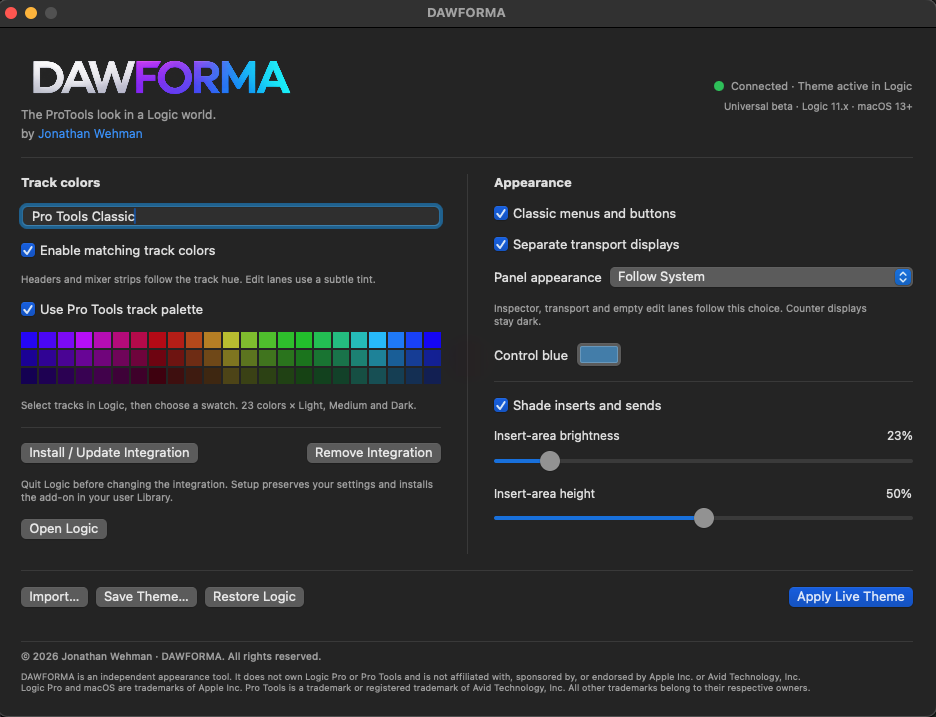
Track colors
- Live themes
- Choose a theme such as Pro Tools Classic and apply it while Logic is running. Save and import your own themes. Restore Logic puts the original look back.
- Matching track colors
- Headers and mixer strips follow the track hue. Edit lanes use a subtle tint.
- Pro Tools track palette
- Select tracks in Logic, then choose a swatch. 23 colors × light, medium and dark.
Appearance
- Panel appearance
- Follow System, Light or Dark. The inspector, transport and empty edit lanes follow this choice. Counter displays stay dark.
- Inserts and sends
- Shade the insert area, and set its brightness and height.
- Control blue
- Pick the blue used for controls.
- Classic touches
- Classic menus and buttons. Separate transport displays.
- Simple setup
- Install or remove the integration from the app. Setup keeps your settings and installs the add-on in your user Library.
Compatibility
One download. Intel or Apple silicon.
DawForma is a universal app. Everyone downloads the same file, and macOS runs the right code for your Mac automatically. Your Logic version matters as much as your chip.
Status
Closed alpha.
DAWFORMA is in closed alpha with a small group of testers. A beta is coming soon, and sign-ups will open on this page.
Beta coming soon
Testing is closed for now while DAWFORMA is in alpha. Follow along on Instagram to hear when the beta opens.
Follow @jonathanwehmanInterested in testing?
Fill out this short form and you'll get the download link right away.
Thanks, you're in.
Here's your download.
Download DawForma betaBefore you install
- Quit Logic, open DAWFORMA and click Install / Update Integration once. After that you don't need to open DAWFORMA again unless you want to change your theme.
- Use an empty test project for your first try.
- The Beta Guide inside the download walks you through install, testing and removal.
- This build isn't notarized yet. If macOS blocks it, don't turn off Gatekeeper or other protections. Send Jonathan the exact message instead.

Download
DawForma
Release notes